
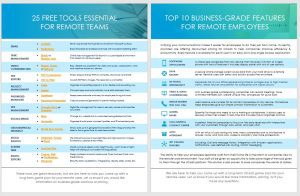
25 free tools essential
for remote teams

These 25 free tools are essential for companies that have employees working from home. The list is from ACS team members who use these tools to help them work from home. Most of the 25 free tools listed below offer paid versions which include more features. 

empower your Client’s business to thrive while Their team works remotely

Remote teams will love these 25 free tools while the company transitions to an online platform.  For more robust and higher-end users, providers are offering promotions on the Top 10 Business-Grade UCaaS Solutions. You can also increase bandwidth, or run a cost savings analysis. call 1-800-247-9964. ACS Cloud Partners, a team of industry experts, are here to help you come up with a long-term game plan for organizations.

Email

Levitate

Send mass emails that look like an email from Microsoft Outlook.

MailChimp

The free version includes basic templates for professional emails with included Marketing CRM

Task Management

Meistertask

Across the world, teams use MeisterTask to organize and manage tasks in a beautifully designed, customizable environment that adapts to their individual needs.

Slack

With all of your communication and tools in one place, remote teams will stay productive no matter where you’re working from.

Video Conferencing

Easy, reliable cloud platform for video and audio, collaboration, chat, and webinars across any device.

Mikogo

An innovative and easy-to-use yet powerful online meeting software solution for companies to host web conferences, online presentations and remote support sessions.

Skype

Built for both one-on-one and group conversations and works wherever you are

Zoom

The leader in modern enterprise video communications, with an easy, reliable cloud platform.

File Editing

PDF Compressor

Simply drag-and-drop PDFs to compress, download, and share.

PDF to PNG

Coverts PDF file to images. The resolution is a lot better.

Project Management

Trello

Boards, lists, and cards to organize and prioritize projects in a fun, flexible, and rewarding way.

Zappier

Connects your apps and automates workflows

Password Manager

Dashlane

Keeps passwords safe and easy for employees to log into tools.

Password Generator

A secure password generator to prevent being hacked.

File Manager

Digital file management for users to securely accessand sharefilesanywhere.

Google Drive

A file storage and synchronization service developed by Google.

Dropbox

Brings all your team’s content together while letting you use the tools you love.

Social Media

Hootsuite

Helps you keep track and manage your many social network channels.

Bit.ly

Change any website link to customized recognizable short links.

Stock Photos

Copyright-free and high-resolution images.Powered by creators everywhere.

UnSplash

The internet’s source of freely usable images. Has the most diverse portfolio.

Pexels

The best free stock photos & videos shared by talented creators.

Burst

Free stock photos for websites and commercial use

Photo Editing

Design professional social media posts, Flyers, Business Cards, and Presentations.

Canva

Create social media graphics, presentations, posters and other visual content. It is available on web and mobile, and integrates millions of images, fonts, templates and illustrations.

Pixlr

Next level, intuitive photo editing with AI-powered tools for quick yet professional edits. Designed to be easy, you can now edit images smarter and faster for Free.

PicMonkey

Create scroll-stopping images for Facebook, Instagram, Youtube and more. Ads, logos? Them too.

Infogram

Beautiful data visualizations -infographics, reports, slides, charts, etc.

Miscellaneous

World Time Buddy

Simply add up to 4 geographical locations then drag and drop the slider to find a good time to meet teammates.

Just Get Flux

Modify computer display color, bright for day, warm tones at night - helps with staring at your screen for long periods

share the knowledge

Get the Free White Sheets

Request our free white sheets to co-brand and share with your business customers.

header

7 Key Products Used in a Remote Work Environment

7 Key Products Used in A Remote Work Environment We have found these 7 key products are a perfect fit for teams working from home. The list is from ACS members who use these tools to help them connect remotely. Most of the 7 key products listed below can be bundled in a Unified Communications (UC) solutions. empower your Client’s business to thrive while Their team works remotely Remote teams will love these 7 key products as they are easy to install and user friendly. To help your customers transition to a UC solution, increase their bandwidth, or run a cost savings analysis – ACS is here for you. It’s time to come up with a long-term game plan for your clients. Call 1-800-247-9964 for more information. Unified Communications UCaaS – (Unified Communications as a Service) is an application that allows users access to their work computers remotely. See the top 10 Business-Grade Features for a UCaaS. Great for businesses who want to decrease their telecom bill, and have an always-on presence. Disaster Recovery Disaster Recovery involves a set of procedures to enable the continuation of vital technology infrastructure and systems following a disaster. A great fit for companies with multiple locations or in an unpredictable area. Video Conferencing With business-grade conferencing, companies can record meetings, have unlimited members join, create unique links, and groups for quick calls. This is a key product for organizations that need to train employees, run webinars, run frequent meetings, or need to speak with clients “face-to-face” in a virtual environment. SD-WAN & Redundancy This is a component that duplicates your data so if your connection fails, there will be a backup. It decreases the risk of your office experiencing internet outages due to high internet traffic. Great failover and perfect for companies with cable circuits. A perfect fit for companies with multiple users on the phone, over an MPLS or cable circuit. End-Point Management It helps users keep track of their devices and ensures their software is secure and up to date. Usually, this product includes asset management, patch management, and compliance evaluation. It is most beneficial for SMBs that don’t have sophisticated tools, which exposes them to security breaches, downtime, and lost productivity. TPX has a great offering. Office365 An online subscription of Microsoft services (Word, Powerpoint, Outlook, etc.) that can be securely accessed on any device. It is the simplest way to move the majority of an organizations’ data to the “cloud”.  Files can be downloaded, edited, moved, and shared via the online portal – www.portal.office.com. Virtual Desktop A computer application that displays the user’s computer monitor. With a simple login, employees can access their office computers anywhere on any device. The operating system and applications are hosted on a remote server. A great example of a virtual desktop is StarDaas from Star2Star. See the StarDaas FAQ Request now Share the knowledge Get the Free White Sheets Request our free white sheets to co-brand and share with your business customers. 25 Free Tools Essential for Remote Teams Top 10 Business-Grade Features for Remote Employees Rise to the top Unifying communications makes it easier for employees to do their job from home. See the Top 10 business-grade features for remote employees. Zero Downtime In a Unified Communications platform, every feature included is available for each employee in an easy all-in-one single access application. Count on Us The ability to help employees separate their work from their home life is hard to achieve for companies new to the remote environment. The advantages of a UCaaS solution are endless. Learn More We Have Great Answers Ask Us Anything What is Unified Communications? Unified Communications (UCaaS) is a platform that securely integrates all your business applications into an easy all-in-one application users can access anywhere on any device. How long does it take to move to the cloud? It usually takes between 7 – 14 business days to process your new software. Once the initial transition is complete, making changes, viewing your files or data, or adding / editing / removing users can be done with a simple click. What does Unified Communications Offer? UCaaS offers greater scalability and flexibility for organizations that need to quickly add/edit/remove users, such as seasonal employees, without major infrastructure changes. UCaaS technology can also be deployed for disaster recovery. Cloud-based systems, for instance, have built-in business continuity.  How does this affect everyday work? Unifying your communications makes it seamless for employees working from home. It improves efficiency and productivity.  How Much does UCaaS Cost? This solution has saved numerous clients thousands of dollars. We guarantee the cost will be less than what you are paying now with your on-site devices (server, desk phones, internet bill, etc).  Customers don’t need to buy and maintain multiple PBX’s because a UC platform is in a separate location and managed by the provider. The average platform is around $20 per user per month. This number can vary based on features and providers of course. There is no installation cost. What is the best advice for a newbie? Demo the platforms with all the providers in the running. Every provider offers a set of features they believe to be important for their clients. We always see clients find it easy to choose a platform based on a winning service during the demo the others don’t have. Bundle your services to decreases overall costs. This includes internet, security, data, backup, and your phone plan. A single bill means loads of integrated features! What does ACS do? ACS Cloud Partners is a communications distributor who has a dedicated team to help our agents find the perfect communications solution that fits your customer’s business size, needs, and budget.  We encourage competition between the providers to win business, help our agents schedule the transition, and ensure quality for the entirety of your customer’s contract. We strive to make our Clients happy We give you the tools to Succeed Business Grade Features


Read More »
header

Top 10 Business-Grade UCaaS Features

Top 10 business-grade uCaaS featuresfor remote employees Unified Communications as a Service – makes it easier for employees to do their job from home. Currently, our providers are offering discounted pricing for bandwidth upgrades, and UCaaS features to help organizations improve efficiency and productivity. All these 10 business-grade UCaaS features and more are available for each user in an easy all-in-one single access application. empower your Client’s business to thrive while Their team works remotely Businesses with employees working from home will find a huge benefit in these 10 Business-Grade UCaaS features. Remote teams will love this high-end online platform.  ACS is here to help come up with a long-term game plan for organizations. Ask our team for our provider promo battle card. Softphone Applications A simple app accessible from any device that has every function of a desk phone. It includes tons of features that include a display panel with lots of user options.​​ Data Backup A secure online storage system saves data from your hard drive to a remote server. Remote users can safely and quickly access files anywhere. Video Conferencing With business-grade conferencing, companies can record meetings, have unlimited members join, create unique links, and groups for quick calls. SD-WAN & Redunancy Decreases risk of your office experiencing internet outages due to high internet traffic. Great failover and perfect for companies with cable circuits. Call & Contact Center A perfect tool for organizations who want to focus on the data received with interactions with their customers through phone calls, email messages, and web chats. Screen Share Essential for those who need to run a training or collaborate. It allows users to securely share their screen in real-time and includes robust organizer controls. Single Number Users receive one number for all contact accessible on any device. This feature helps employees give out simple contact information to customers. Auto Attendant With an influx of calls, many organizations look to this feature to answer, route, and hold calls. It helps make a company look more professional. Virtual Desktop A computer application that displays the user’s computer monitor. With a simple login, they can access their office computer anywhere on any device. 40+ Calling Features Includes: Call and message history, 3rd party application integration, notifications, user-defined call routing, instant messaging, etc. Request now share the knowledge Get the Free White Sheets Request our free white sheets to co-brand and share with your business customers. 25 Free Tools Essential for Remote Teams Top 10 Business-Grade Features for Remote Employees 7 Key Products Used in A remote Work Environment Rise to the top Increase Productivity Unifying communications makes it easier for employees to do their job from home. The 10 business-grade features for remote employees listed above help organizations achieve maximum productivity. Zero Downtime Seamless Transition In a Unified Communications platform, every feature included is available for each employee in an easy all-in-one single access application. Count on Us Best Practices The ability to help employees separate their work from their home life is hard to achieve for companies new to the remote environment. The advantages of a UCaaS solution are endless. Learn More We Have Great Answers Ask Us Anything What is Unified Communications? Unified Communications (UCaaS) is a platform that securely integrates all your business applications into an easy all-in-one application users can access anywhere on any device. How long does it take to move to the cloud? It usually takes between 7 – 14 business days to process your new software. Once the initial transition is complete, making changes, viewing your files or data, or adding / editing / removing users can be done with a simple click. What does Unified Communications Offer? UCaaS offers greater scalability and flexibility for organizations that need to quickly add/edit/remove users, such as seasonal employees, without major infrastructure changes. UCaaS technology can also be deployed for disaster recovery. Cloud-based systems, for instance, have built-in business continuity.  How does this affect everyday work? Unifying your communications makes it seamless for employees working from home. It improves efficiency and productivity.  How Much does UCaaS Cost? This solution has saved numerous clients thousands of dollars. We guarantee the cost will be less than what you are paying now with your on-site devices (server, desk phones, internet bill, etc).  Customers don’t need to buy and maintain multiple PBX’s because a UC platform is in a separate location and managed by the provider. The average platform is around $20 per user per month. This number can vary based on features and providers of course. There is no installation cost. What is the best advice for a newbie? Demo the platforms with all the providers in the running. Every provider offers a set of features they believe to be important for their clients. We always see clients find it easy to choose a platform based on a winning service during the demo the others don’t have. Bundle your services to decreases overall costs. This includes internet, security, data, backup, and your phone plan. A single bill means loads of integrated features! What does ACS do? ACS Cloud Partners is a communications distributor who has a dedicated team to help our agents find the perfect communications solution that fits your customer’s business size, needs, and budget.  We encourage competition between the providers to win business, help our agents schedule the transition, and ensure quality for the entirety of your customer’s contract. We strive to make our Clients happy We give you the tools to Succeed Request Provider Promo BattleCard

Read More »

Rise to the top

Increase Productivity

Unifying communications makes it easier for employees to do their job from home. See the Top 10 business-grade features for remote employees.

Zero Downtime

Seemless Transition

In a Unified Communications platform, every feature included is available for each employee in an easy all-in-one single access application.

Count on Us

Best Practices

The ability to help employees separate their work from their home life is hard to achieve for companies new to the remote environment. The advantages of a UCaaS solution are endless.

header
header

We Have Great Answers

Ask Us Anything

Unified Communications (UCaaS) is a platform that securely integrates all your business applications into an easy all-in-one application users can access anywhere on any device.

It usually takes between 7 – 14 business days to process your new software. Once the initial transition is complete, making changes, viewing your files or data, or adding / editing / removing users can be done with a simple click.

UCaaS offers greater scalability and flexibility for organizations that need to quickly add/edit/remove users, such as seasonal employees, without major infrastructure changes.

UCaaS technology can also be deployed for disaster recovery. Cloud-based systems, for instance, have built-in business continuity. 

Unifying your communications makes it seamless for employees working from home. It improves efficiency and productivity. 

This solution has saved numerous clients thousands of dollars. We guarantee the cost will be less than what you are paying now with you on-site devices (server, desk phones, internet bill, etc). 

Customers don’t need to buy and maintain multiple PBX’s because a UC platform is in a separate location and managed by the provider.

The average platform is around $20 per user per month. This number can vary based on features and providers of course. There is no installation cost.

Demo the platforms with all the providers in the running. Every provider offers a set of features they believe to be important for their clients. We always see clients find it easy to choose a platform based on a winning service during the demo the others don’t have.

Bundle your services to decreases overall costs. This includes, internet, security, data, backup, and your phone plan. A single bill means loads of integrated features!

ACS Cloud Partners is a communications distributor who has a dedicated team to help our agents find the perfect communications solution that fit your customer’s business size, needs, and budget. 

We encourage competition between the providers to win business, help our agents schedule the transition, and ensure quality for the entirety of your customer’s contract.

We strive to make our Clients happy

We give you the tools to Succeed

header
small_c_popup.png

Contact Us

Request More Information

Subscribe to our Newsletter

* indicates required field
 
 Email Address *    
 
First Name              
 
Last Name              
 
Phone Number      
 
Company